# Availability and Resiliency
> Silo availability and resiliency in production environments
---
LLMS index: [llms.txt](/llms.txt)
---
This page provides an overview of MinIO’s availability and resiliency design and features from a production perspective.
> [!NOTE]
> **Note**
>
> The contents of this page are intended as a best-effort guide to understanding MinIO’s intended design and philosophy behind availability and resiliency. It cannot replace the functionality of [MinIO SUBNET](https://min.io/pricing?jmp=docs), which allows for coordinating with MinIO Engineering when planning your MinIO deployments.
>
> Community users can seek support on the [MinIO Community Slack](https://slack.min.io). Community Support is best-effort only and has no SLAs around responsiveness.
## Distributed MinIO Deployments {#distributed-minio-deployments}
**MinIO implements [erasure coding](/operations/concepts/erasure-coding/#minio-erasure-coding) as the core component in providing availability and resiliency during drive or node-level failure events.**
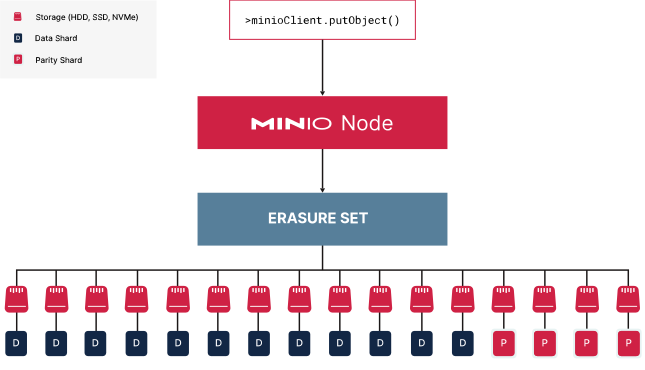
> MinIO partitions each object into data and [parity](/operations/concepts/erasure-coding/#minio-ec-parity) shards and distributes those shards across a single [erasure set](/operations/concepts/erasure-coding/#minio-ec-erasure-set).
>
>
>
> This small one-node deployment has 16 drives in one erasure set.
> Assuming default parity of EC:4, MinIO partitions the object into 4 (four) parity shards and 12 (twelve) data shards.
> MinIO distributes these shards evenly across each drive in the erasure set.
>
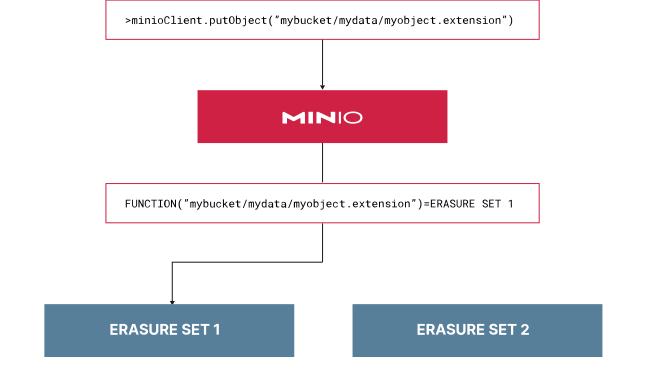
**MinIO uses a deterministic algorithm to select the erasure set for a given object.**
> For each unique object namespace `BUCKET/PREFIX/[PREFIX/...]/OBJECT.EXTENSION`, MinIO always selects the same erasure set for read/write operations. This includes all [versions](/administration/object-management/object-versioning/#minio-bucket-versioning) of that same object.
>
>
>
> MinIO calculates the destination erasure set using the full object namespace.
>
**MinIO requires [read and write quorum](/operations/concepts/erasure-coding/#minio-read-quorum) to perform read and write operations against an erasure set.**
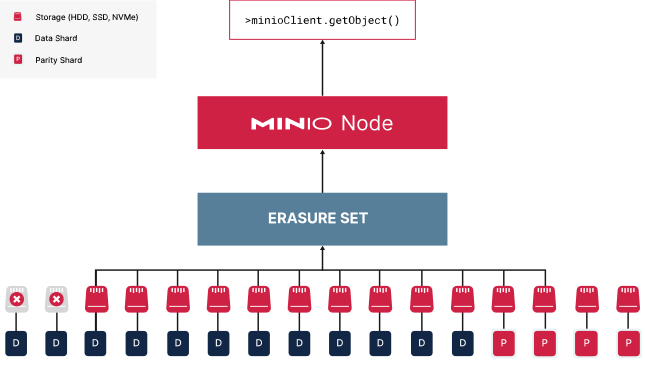
> For an ordinary, non-empty object stored locally, let `N` be the number of drives in its erasure set, `M` its parity shard count, and `K=N-M` its data shard count. The normal read quorum is `K`, not `M`: its data can be reconstructed from `K` healthy shards, tolerating up to `M` unavailable shards. Object access must also satisfy the applicable metadata quorum. Use the parity recorded for that object: changing the configured default does not change its existing shards. These shard counts do not cover all metadata or initialization requirements; for example, tiered objects and delete markers follow different metadata quorum rules, and disabling default parity can require all drives for metadata reads.
>
>
>
> This node has two failed drives.
> MinIO uses parity shards to replace the lost data shards automatically and serves the reconstructed object to the requesting client.
>
>
> An object stored with `EC:4` can tolerate 4 (four) unavailable shards in its erasure set and remain readable if the remaining shards are intact and metadata quorum is met.
**Write quorum depends on the configured parity and the size of the erasure set.**
> If `M < N/2`, write quorum is `K=N-M`. If `M=N/2`, write quorum is `K+1`. For a new write, calculate these values from the shard layout selected for that write.
>
> With `MINIO_STORAGE_CLASS_OPTIMIZE=availability`, SILO can increase parity for new objects written to a degraded erasure set, up to `floor(N/2)` parity shards. This can improve redundancy for those new objects, but does not guarantee unchanged availability or bypass write quorum. Repair or replace failed drives to restore the set to full health.
>
>
>
> This node has two failed drives.
> In this example, SILO increases the parity of the new object to EC:6.
>
>
> For a fixed `EC:4` layout in the 16-drive example above, `K=12` and write quorum is 12, leaving room for 4 unavailable drives. Parity upgrades for new writes can change that layout and its write quorum; this example is not a universal failure limit for all deployments that use `EC:4`.
**If parity equals 1/2 (half) the number of erasure set drives, write quorum equals parity + 1 (one) to avoid data inconsistency due to “split brain” scenarios.**
> For example, if a network fault isolates exactly half the drives and `M=N/2`, neither half can meet the required write quorum of `K+1=N/2+1`.
>
>
>
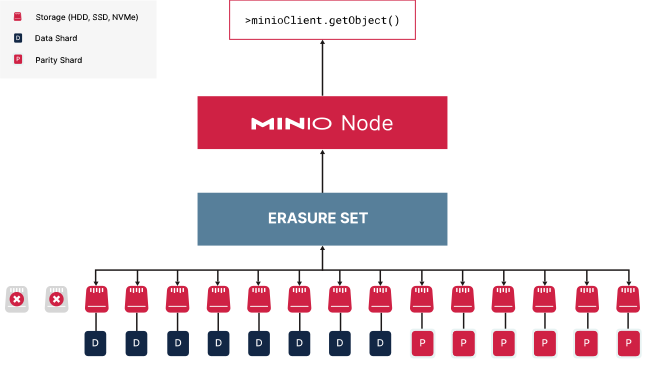
> This node has 50% drive failure.
> If parity is EC:8, this erasure set cannot meet write quorum and MinIO rejects write operations to that set.
> Since the erasure set still maintains read quorum, read operations to existing objects can still succeed.
>
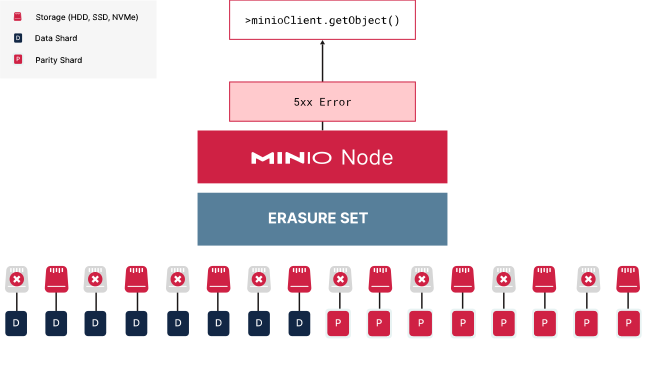
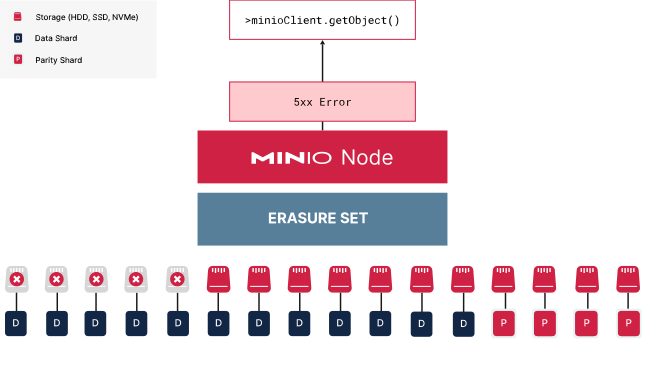
**An object's data cannot be reconstructed from its erasure set if more than its own `M` shards are permanently lost.**
> In an even-sized set with maximum parity (`K=M=N/2`), losing half the drives can leave enough intact shards to read an object, but not enough drives to write to the set. For example, a 16-drive object written with `EC:8` has a read quorum of 8 and a write quorum of 9. Permanently losing 9 of its shards prevents reconstruction of that object. Objects written with lower parity have lower failure tolerance.
>
>
>
> This erasure set has permanently lost more than 4 drives.
> Objects stored with EC:4 cannot be reconstructed from their remaining shards.
>
>
> Transient or temporary drive failures, such as due to a failed storage controller or connecting hardware, may recover back to normal operational status within the erasure set.
**MinIO further mitigates the risk of erasure set failure by “striping” erasure set drives symmetrically across each node in the pool.**
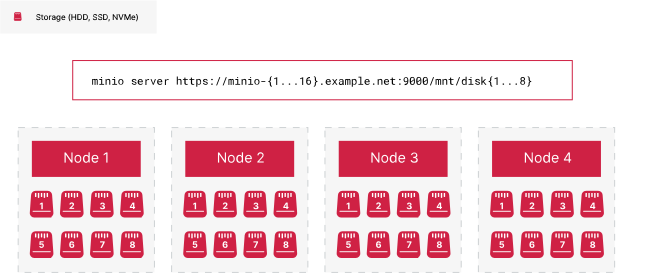
> MinIO automatically calculates the optimal erasure set size based on the number of nodes and drives, where the maximum set size is 16 (sixteen). It then selects one drive per node going across the pool for each erasure set, circling around if the erasure set stripe size is greater than the number of nodes. Spreading a set across nodes limits the shards lost with one node, but continued reads and writes still depend on each affected set meeting the corresponding quorum.
>
>
>
> In this 16 x 8 deployment, MinIO would calculate 8 erasure sets of 16 drives each.
> It allocates one drive per node across the available nodes to fill each erasure set.
> If there were 8 nodes, MinIO would need to select 2 drives per node for each erasure set.
>
>
> In the above topology, the pool has 8 erasure sets of 16 drives each striped across 16 nodes. Each node would have one drive allocated per erasure set. While losing one node would technically result in the loss of 8 drives, each erasure set would only lose one drive each. This maintains quorum despite the node downtime.
**Each erasure set is independent of all others in the same pool.**
> If one erasure set becomes completely degraded, MinIO can still perform read/write operations on other erasure sets.
>
>
>
> One pool has a degraded erasure set.
> While MinIO can no longer serve read/write operations to that erasure set, it can continue to serve operations on healthy erasure sets in that pool.
>
>
> However, the lost data may still impact workloads which rely on the assumption of 100% data availability. Furthermore, each erasure set is fully independent of the other such that you cannot restore data to a completely degraded erasure set using other erasure sets. You must use [Site](/operations/replication/multi-site-replication/#minio-site-replication-overview) or [Bucket](/administration/bucket-replication/#minio-bucket-replication) replication to create a BC/DR-ready remote deployment for restoring lost data.
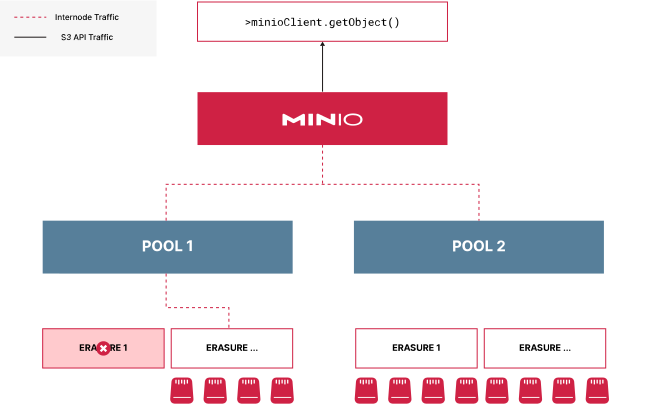
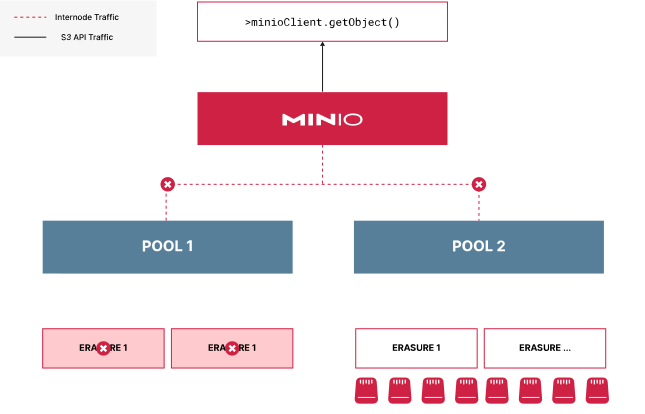
**For multi-pool MinIO deployments, each pool requires at least one erasure set maintaining read/write quorum to continue performing operations.**
> If one pool loses all erasure sets, MinIO can no longer determine whether a given read/write operation would have routed to that pool. MinIO therefore stops all I/O to the deployment, even if other pools remain operational.
>
>
>
> One pool in this deployment has completely failed.
> MinIO can no longer determine which pool or erasure set to route I/O to.
> Continued operations could produce an inconsistent state where an object and/or it’s versions reside in different erasure sets.
> MinIO therefore halts all I/O in the deployment until the pool recovers.
>
>
> To restore access to the deployment, administrators must restore the pool to normal operations. This may require formatting disks, replacing hardware, or replacing nodes depending on the severity of the failure. See [Recover after Hardware Failure](/operations/data-recovery/#minio-restore-hardware-failure) for more complete documentation.
>
> Use replicated remotes to restore the lost data to the deployment. All data stored on the healthy pools remain safe on disk.
> [!NOTE]
> **Exclusive access to drives**
>
> MinIO **requires** *exclusive* access to the drives or volumes provided for object storage. No other processes, software, scripts, or persons should perform *any* actions directly on the drives or volumes provided to MinIO or the objects or files MinIO places on them.
>
> Unless directed by MinIO Engineering, do not use scripts or tools to directly modify, delete, or move any of the data shards, parity shards, or metadata files on the provided drives, including from one drive or node to another. Such operations are very likely to result in widespread corruption and data loss beyond MinIO’s ability to heal.
## Replicated MinIO Deployments {#replicated-minio-deployments}
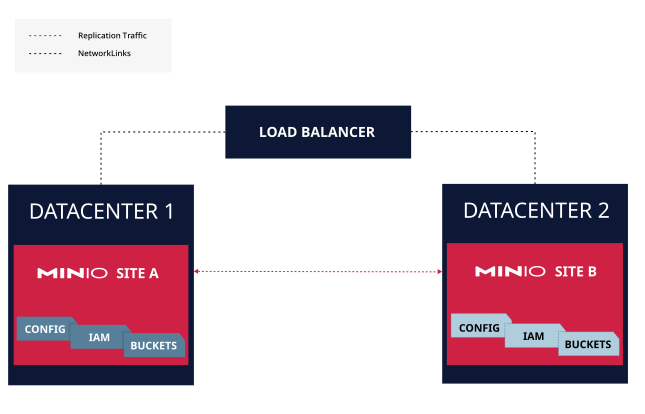
**MinIO implements [site replication](/operations/replication/multi-site-replication/#minio-site-replication-overview) as the primary measure for ensuring Business Continuity and Disaster Recovery (BC/DR) in the case of both small and large scale data loss in a MinIO deployment.**
>
>
> Each peer site is deployed to an independent datacenter to provide protection from large-scale failure or disaster.
> If one datacenter goes completely offline, clients can fail over to the other site.
>
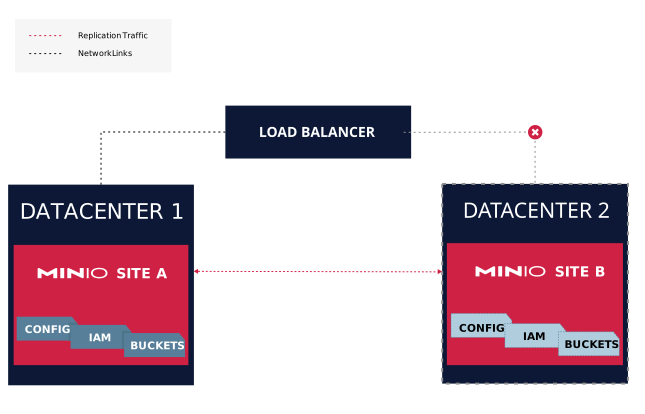
**MinIO replication can automatically [heal](/operations/concepts/healing/#minio-concepts-healing) a site that has partial or total data loss due to transient or sustained downtime.**
>
>
> Datacenter 2 was down and Site B requires resynchronization.
> The Load Balancer handles routing operations to Site A in Datacenter 1.
> Site A continuously replicates data to Site B.
>
>
> Once all data synchronizes, you can restore normal connectivity to that site. Depending on the amount of replication lag, latency between sites and overall workload I/O, you may need to temporarily stop write operations to allow the sites to completely catch up.
>
> If a peer site completely fails, you can remove that site from the configuration entirely. The load balancer configuration should also remove that site to avoid routing client requests to the offline site.
>
> You can then restore the peer site, either after repairing the original hardware or replacing it entirely, by [adding it back to the site replication configuration](/operations/replication/multi-site-replication/#minio-expand-site-replication). MinIO automatically begins resynchronizing existing data while continuously replicating new data.
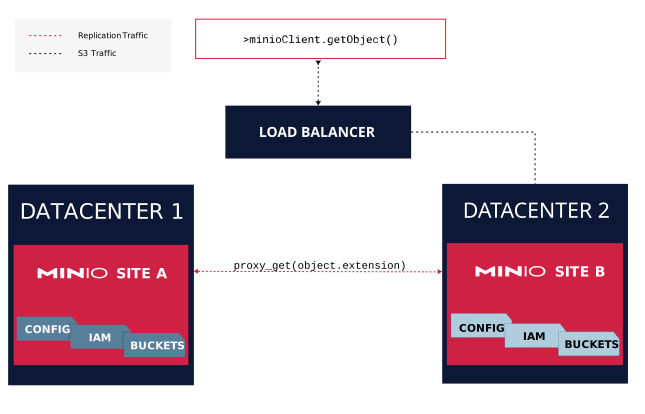
**Sites can continue processing operations during resynchronization by proxying `GET/HEAD` requests to healthy peer sites**
>
>
> Site B does not have the requested object, possibly due to replication lag.
> It proxies the GET request to Site A.
> Site A returns the object, which Site B then returns to the requesting client.
>
>
> The client receives the results from first peer site to return *any* version of the requested object.
>
> `PUT` and `DELETE` operations synchronize using the regular replication process. `LIST` operations do not proxy and require clients to issue them exclusively against healthy peers.
 >
>  >
>  >
>  >
>  >
>  >
>  >
>  >
>  >
>  >
>  >
>  >
>