SILO upgrade requirements: the September IAM repairs require a coordinated upgrade of all participating nodes and a backup containing deletion history. Read IAM Upgrade and Recovery and Audit Historical Replica State, and use the component matrix to distinguish main from published artifacts.
Site replication configures multiple independent MinIO deployments as a cluster of replicas called peer sites.
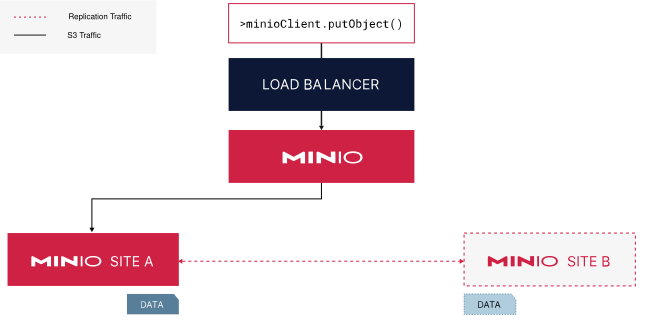
A site replication deployment with two peer sites.
A load balancer manages routing operations to either of the two sites.
Data written to one site automatically replicates to the other peer site.
Site replication assumes the use of either the included MinIO identity provider (IDP) or an external IDP. All configured deployments must use the same IDP. Deployments using an external IDP must use the same configuration across sites.
MinIO does not recommend using macOS, Windows, or non-orchestrated container deployments for site replication outside of early development, evaluation, or general experimentation. For production, use a supported Linux or Kubernetes deployment and follow the site-replication procedure on this page.
Overview
What Replicates Across All Sites
Each MinIO deployment (“peer site”) synchronizes the following changes across the other peer sites:
Creation, modification, and deletion of buckets and objects, including
After the initial synchronization of data across peer sites, MinIO continually replicates and synchronizes replicable data among all sites as they occur on any site.
Site Healing
Any MinIO deployment in the site replication configuration can resynchronize damaged replica-eligible data from the peer with the most updated (“latest”) version of that data.
Note
Changed: RELEASE.2023-07-18T17-49-40Z
Site replication operations retry up to three (3) times.
MinIO dequeues replication operations that fail to replicate after three attempts. The scanner picks up those affected objects at a later time and requeues them for replication.
Note
Changed: RELEASE.2022-08-11T04-37-28Z
Failed or pending replications requeue automatically when performing any GET or HEAD API method. For example, using mc stat, mc cat, or mc ls commands after a site comes back online prompts healing to requeue.
Note
Changed: RELEASE.2022-12-02T23-48-47Z
If one site loses data for any reason, resynchronize the data from another healthy site with mc admin replicate resync. This launches an active process that resynchronizes the data without waiting for the passive MinIO scanner to recognize the missing data.
You can adjust how MinIO balances the scanner performance with read/write operations using either the MINIO_SCANNER_SPEED environment variable or the scanner speed configuration setting.
Synchronous vs Asynchronous Replication
MinIO supports specifying either asynchronous (default) or synchronous replication for a given remote target.
With asynchronous replication, MinIO completes the originating PUT operation before placing the object into a replication queue. The originating client may therefore see a successful PUT operation before the object is replicated. While this may result in stale or missing objects on the remote, it mitigates the risk of slow write operations due to replication load.
With synchronous replication, MinIO attempts to replicate the object prior to completing the originating PUT operation. MinIO returns a successful PUT operation whether or not the replication attempt succeeds. This reduces the risk of slow write operations at a possible cost of stale or missing objects on the remote location.
MinIO strongly recommends using the default asynchronous site replication. Synchronous site replication performance depends strongly on latency between sites, where higher latency can result in lower PUT performance and replication lag. To configure synchronous site replication use mc admin replicate update with the --mode option.
Proxy to Other Sites
MinIO peer sites can proxy GET/HEAD requests for an object to other peers to check if it exists. This allows a site that is healing or lagging behind other peers to still return an object persisted to other sites.
For example:
A client issues GET("data/invoices/january.xls") to Site1
Site1 cannot locate the object
Site1 proxies the request to Site2
Site2 returns the latest version of the requested object
Site1 returns the proxied object to the client
For GET/HEAD requests that do not include a unique version ID, the proxy request returns the latest version of that object on the peer site. This may result in retrieval of a non-current version of an object, such as if the responding peer site is also experiencing replication lag.
MinIO does not proxy LIST, DELETE, and PUT operations.
Prerequisites
Back Up Cluster Settings First
Use the mc admin cluster bucket export and mc admin cluster iam export commands to take a snapshot of the bucket metadata and IAM configurations respectively prior to configuring Site Replication. You can use these snapshots to restore bucket/IAM settings in the event of misconfiguration during site replication configuration.
One Site with Data at Setup
Only one site can have data at the time of setup. The other sites must be empty of buckets and objects.
After configuring site replication, any data on the first deployment replicates to the other sites.
All Sites Must Use the Same IDP
All sites must use the same Identity Provider. Site replication supports the included MinIO IDP, OIDC, or LDAP.
All Sites Must use the Same MinIO Server Version
All sites must have a matching and consistent MinIO Server version. Configuring replication between sites with mismatched MinIO Server versions may result in unexpected or undesired replication behavior.
You should also ensure the mc version used to configure replication closely matches the server version.
Access to the Same Encryption Service
For SSE-S3 or SSE-KMS encryption via Key Management Service (KMS), all sites must have access to a central KMS deployment.
You can achieve this with a central KES server or multiple KES servers (say one per site) connected via a central supported key vault server.
Replication Requires Versioning
Site replication requiresBucket Versioning and enables it for all created buckets automatically. You cannot disable versioning in site replication deployments.
MinIO cannot replicate objects in prefixes in the bucket that you excluded from versioning.
Load Balancers Installed on Each Site
Specify the URL or IP address of the site’s load balancer, reverse proxy, or similar network control plane component. Requests are automatically routed to nodes in the deployment.
MinIO recommends against using a single node hostname for a peer site. This creates a single point of failure: if that node goes offline, replication fails.
Switch to Site Replication from Bucket Replication
Bucket replication and multi-site replication are mutually exclusive. You cannot use both replication methods on the same deployments.
If you previously set up bucket replication and wish to now use site replication, you must first delete all of the bucket replication rules on the deployment that has data when initializing site replication. Use mc replicate rm on the command line to remove bucket replication rules.
Only one site can have data when setting up site replication. All other sites must be empty.
The three sites use aliases, minio1, minio2, and minio3, and only minio1 contains any data.
Deploy three or more separate MinIO sites, using the same IDP
Start with empty sites or have no more than one site with any replicable data.
Configure an alias for each site
Specify the URL or IP address of the site’s load balancer, reverse proxy, or similar network control plane component. Requests are automatically routed to nodes in the deployment.
MinIO recommends against using a single node hostname for a peer site. This creates a single point of failure: if that node goes offline, replication fails.
For example, for three MinIO sites, you might create aliases minio1, minio2, and minio3.
Use mc alias set to define the hostname or IP of the load balancer managing connections to the site.
mc aliasset minio1 https://minio1.example.com:9000 adminuser adminpassword
mc aliasset minio2 https://minio2.example.com:9000 adminuser adminpassword
mc aliasset minio3 https://minio3.example.com:9000 adminuser adminpassword
If all sites are empty, the order of the aliases does not matter. If one of the sites contains any replicable data, you must list it first.
No more than one site can contain any replicable data.
Query the site replication configuration to verify
mc admin replicate info minio1
You can use the alias for any peer site in the site replication configuration.
Query the site replication status to confirm any initial data has replicated to all peer sites.
mc admin replicate status minio1
You can use the alias for any of the peer sites in the site replication configuration. The output should say that all replicable data is in sync.
The output could resemble the following:
Bucket replication status:
●  1/1 Buckets in sync

Policy replication status:
●  5/5 Policies in sync

User replication status:
No Users present

Group replication status:
No Groups present
You can add more sites to an existing site replication configuration.
The new site must meet the following requirements:
Site is fully deployed and accessible by hostname or IP
Shares the IDP configuration as all other sites in the configuration
Uses the same root user credentials as other configured sites
Contains no bucket or object data
Deploy the new MinIO peer site(s) following the stated requirements
Configure an alias for the new site
Specify the URL or IP address of the site’s load balancer, reverse proxy, or similar network control plane component. Requests are automatically routed to nodes in the deployment.
MinIO recommends against using a single node hostname for a peer site. This creates a single point of failure: if that node goes offline, replication fails.
Use the mc admin replicate add command to expand the site replication configuration with the new peer site. Specify the alias of all existing peer sites, then the alias of the new site to add.
For example, the following command adds the new peer site minio4 to an existing site replication configuration that includes the existing sites minio1, minio2, and minio3.
mc admin replicate add minio1 minio2 minio3 minio4
Note
Note
If any of the sites are unreachable or permanently lost, you must first remove the unreachable site(s) with mc admin replicate rm before expanding with the new site.
Query the site replication configuration to verify
mc admin replicate info minio1
Modify a Site’s Endpoint
If a peer site changes its hostname, you can modify the replication configuration to reflect the new hostname.
mc admin replicate update ALIAS --deployment-id [DEPLOYMENT-ID] --endpoint [NEW-ENDPOINT]
Replace [DEPLOYMENT-ID] with the deployment ID of the site to update.
Replace [NEW-ENDPOINT] with the new endpoint for the site.
Specify the URL or IP address of the site’s load balancer, reverse proxy, or similar network control plane component. Requests are automatically routed to nodes in the deployment.
MinIO recommends against using a single node hostname for a peer site. This creates a single point of failure: if that node goes offline, replication fails.
Remove a Site from Replication
You can remove a site from replication at any time. You can re-add the site at a later date, but you must first completely wipe bucket and object data from the site.